The risks of building models in Excel are underestimated.
Excel is too versatile for critical models
One of the most used software tools in the world, Excel turned 40 in 2025. It can do everything short of making coffee. But its versatility is also the source of huge risks.
Models typically have a huge number of formulas
Complex models used in consulting and financial services typically have at least 25,000 formulas.
Errors are unavoidable
Each formula requires careful check. Even so, it's impossible to reduce the chance of error to less than 10%.
Validation is an illusion
Fully explaining a complex model to a colleague is impossible, so most models are never fully validated.
What is your biggest headache when building Excel models?
Results of qualitative LinkedIn survey, June 2025, N=37
We believe models should be easy to build, explainable and reliable
Centered on the business professional
Many domains have their specialized modeling software, but not corporate decision-making. How many times have we collectively recreated a valuation model or a project ROI model?
A business-oriented approach is needed to program our models using a more concise and efficient language.
Transparency at the core
The logic of a sophisticated model is highly non-linear, with many branches that split and merge.
This needs to be represented visually with information that can be understood fast. Formulas do not offer that type of transparency, so this requires an innovative approach.
Errors minimized at the source
Typical errors in data processing have been known for decades. A formula not properly dragged to the bottom of the column, duplicate records in a table joined using VLOOKUP, all these have led to catastrophic consequences.
We believe the software should prevent these errors or at least warn the user if they're at risk.
How does River work?
River focuses on making building models efficient, transparent and safe.
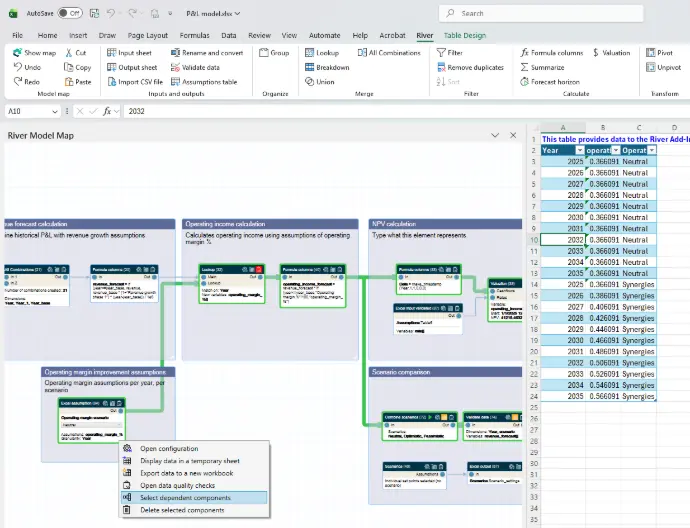
Visually explainable models
The model is built as a visual map, for the analyst to easily validate the logic with their manager or an expert.
Hierarchical structure is added to further improve comprehension.
Each component is a mid-level abstraction, making the model easily readable.
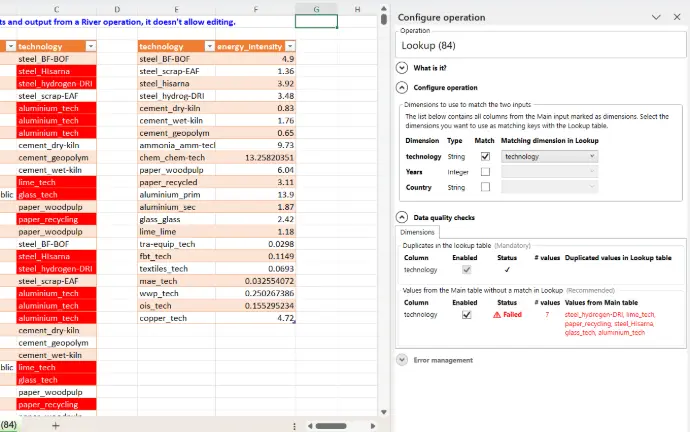
Error prevention and detection
Each component is easy to configure and prevents analysts from making mistakes.
In addition, data quality checks are automatically enabled and warn of current issues.
An audit report can be generated to review all model risks.
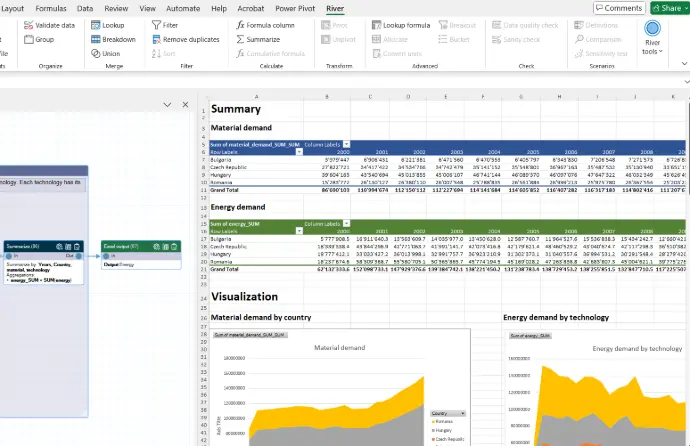
Integrated in Excel
All features are accessed from Excel, and the model is saved with the data in the Excel workbook itself.
Model data can be freely explored and visualized using Excel's standard features.
This helps analysts go up the learning curve and become professional modelers.
Watch the overview video
Frequently asked questions
Of course! It is strongly encouraged. River models are saved inside the Excel workbook together with the data it uses, making sharing very easy.
You currently need a license to be able to view the model in a workbook, but we're designing a "viewer" version that will allow people without a license to open the model in read-only mode.
If you just want to keep the model for reference, no need to do anything. When your current River license expires, you will always be able to open the Excel workbook and see the input and output data of your model. With the "viewer" version of River, you will also be able to see all the modeling logic and its parameters.
If you want to recreate your model using plain Excel (or another tool), you can use it as a guide during your rebuild.
We come from the consulting industry, where protection of client data is a top priority.
Therefore we designed River so that it runs entirely on your computer, and no data from your workbook is ever leaving.
The only data that River can send is application usage data, to help us build the product. And you can decline this option.
River has been carefully designed to have the smallest possible footprint.
It is packaged in a single Excel Add-In, doesn't send data outside your computer and can be deployed using corporate IT tools.
If you already use think-cell (another popular Add-In), chances are your IT will easily approve it. Otherwise feel free to contact us at info@river-solutions.com.
We currently provide support via via email. Over time we will build our support offering.
Want to know more? Get in touch!

Supported by
Fondation Genevoise pour l'Innovation Technologique
River has been awarded Innovation Initiation Support by FONGIT